 ameya labs
Choose the page before the pictures
Decide whether you are using ordinary A4 or US Letter paper, or smaller photo paper. A layout that looks generous on Letter can become cramped on a small sheet. Think about the smallest photo you actually want to hold, not just how many fit on the screen.
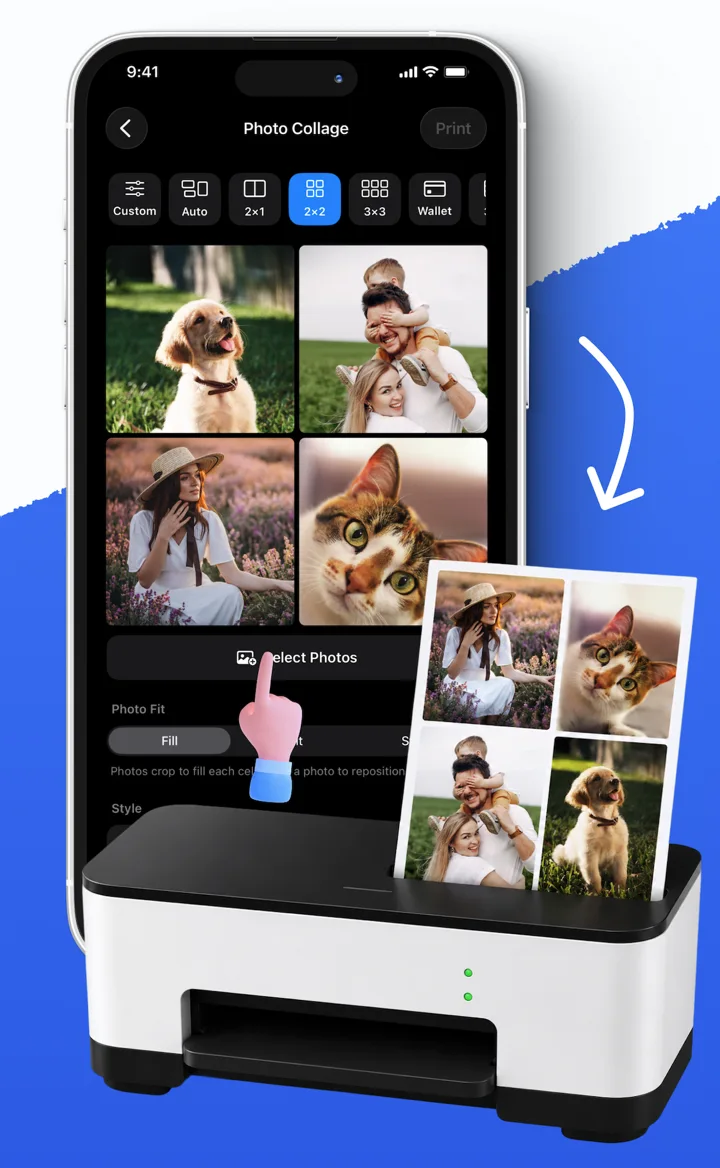
Smart Printer App’s Collage tool has grids such as 2 × 2 and 3 × 4, plus custom rows and columns. A grid gives different photos a consistent place on the page. If you have more pictures than one page holds, check the page count before printing.
Build the sheet in Smart Printer App
- Open Collage and choose your photos.
- Select a grid. Four pictures is a useful starting point for a small set.
- Reorder the photos so the arrangement reads naturally.
- Choose Fit to keep each whole image, or Fill to cover each frame.
- Adjust the spacing and inspect the preview, especially faces near the edges.
- Choose your printer and paper settings, then print one copy first.
Fit and Fill solve different problems
Fit keeps the entire image visible, which can leave space around it. Fill removes that space by cropping the image to the shape of its frame. Neither is always better: a landscape with room around the subject may crop beautifully, while a group photo may lose someone at the edge.
Avoid Stretch for faces or anything whose proportions matter. Stretch fills the frame by changing the picture’s shape. It is different from cropping.
Check the first page, then print the rest
Look for cut-off faces, unexpected margins and text that has become too small. Physical margins depend on the printer and paper settings, so a full-looking preview does not guarantee borderless output.
For a single ordinary photo, the iPhone’s built-in print option may be enough. When you want several pictures arranged together, Smart Printer App gives you control over the sheet before it reaches that print step.
Sources and further reading
Written by Ameya Labs, makers of Smart Printer App. Printer settings and results depend on your model; check a sample before making multiple copies. Something unclear? Tell us.